There is no shortage of task managers. Records go missing not for lack of will but because of when the question is asked — ask hours after the fact and nobody answers.
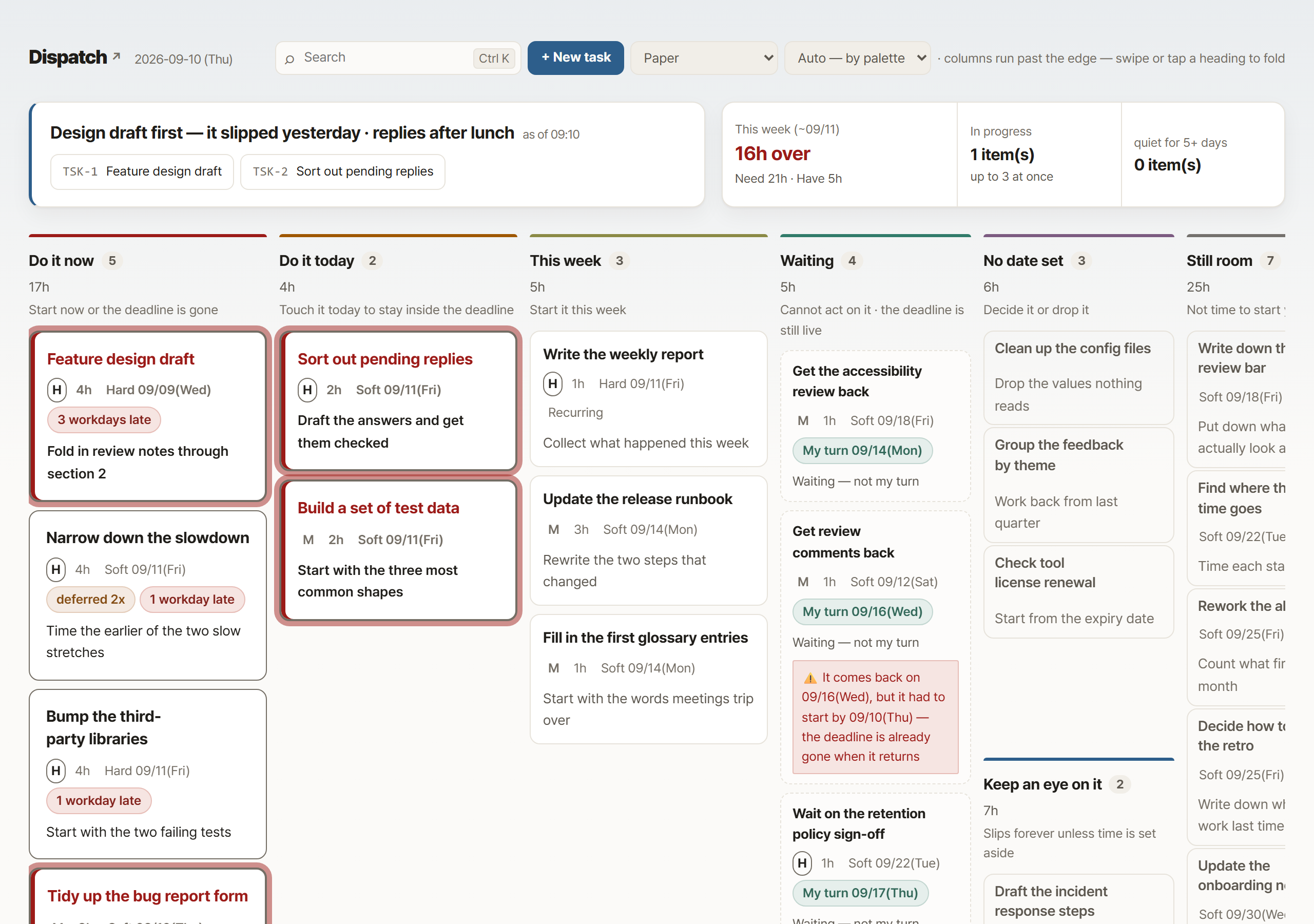
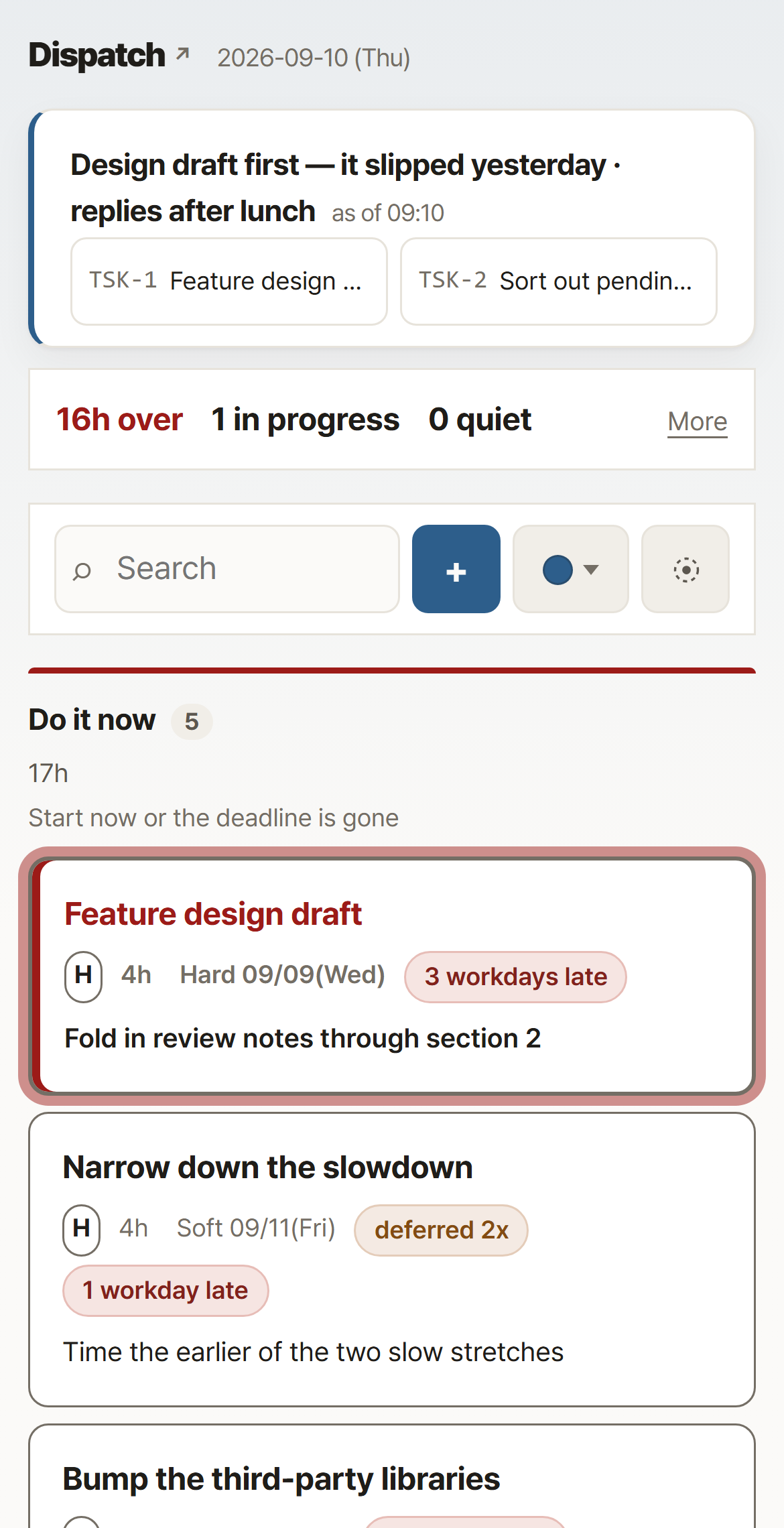
Terminal · work chat · a kanban board on your phone — the same rules and the same tools across all three
dispatchflow.cc / board
one dayto fill every empty field once the moment of asking moved
sixways work comes and goes · one is typed by a person
95.0%accuracy judging mail
sevencolumns, sorted by deadline arithmetic
3.3sfrom a tap to the board updating
$30what the model costs a month
WHAT IT DOES
Six ways work comes and goes. Only one is typed by a person
The assistant does the rest by itself. However it arrives, it lands in the same single markdown file, goes through the same arithmetic, and shows up on the same screen.
TYPED BY A PERSON
Say it in ordinary words
Work chat, the board's prompt field, the terminal. Drop a sentence the way you would say it out loud and it lands on the matching one among your open tasks as a new task, a postponement or a log entry. You never pick which task; it asks back only when two or more have similar names. No form, no syntax. The raw text is saved before anything tries to read it, so a failed reading loses nothing.
Raw text saved first · a failure leaves it sitting in the queue
GATHERED ON ITS OWN
Progress is recorded without you writing it up
Point a task at a working directory and that folder's commits are attached to its progress log every evening. It does not care which tool made them — a commit typed by hand is caught the same way. A commit says "worked on it", not "finished it", so the status is left alone.
Tool-agnostic · a hand-typed commit is caught the same way
ARRIVES FROM OUTSIDE
It finds the work you missed in mail and the calendar
Two weeks of mail is cut to roughly a quarter by a filter, then sorted five ways: create, update, reply, drop, or ask. Calendar entries with no task behind them are held up against the list too. Creating a task is approved by a person.
95.0% accuracy on that sorting · scored by hand over 140 items
COMES OUT OF ARITHMETIC
It counts the start date back from the deadline
Estimated hours and a buffer are subtracted back from the deadline to give a latest start date. Nobody works out dates in their head, and a card you should have started today but have not touched blinks on its own.
Open tasks sort themselves into seven columns
SENT BACK OUT
It takes care of weekly hours and backups for you
It drafts the week's 40 hours out of the progress logs and spreads them across issue-tracker tickets, and it sends the data and the design documents off the machine at a fixed time every day. Posting to the issue tracker is approved by a person.
Hours by the week · backup at a fixed time every day
WHERE IT LANDS
One markdown file is the source of truth
One file is one task: the front matter holds its fields, the body holds its progress log. Any markdown editor opens it as it is. One write is one commit, so a task's history is its version history.
One write, one commit · task history is version history
What it connects to
Two-wayWork chatTakes work in, sends nudges out
ReadsWork mailOutlook, Gmail and others — proposes candidates
ReadsCalendarWriting an entry is approved by a person
WritesIssue trackerWeekly hours — posting them is approved by a person
ReadsCode repositoriesCommits are collected into the progress log
Runs onThe boardCloud, on-premises or a local server
THE PROBLEM
Open the list. These questions still have no answer
The task list was always there. But it does not answer the questions you ask every morning.
What should I start on today?
The list holds the due date and nothing else. Whether the work has to start today is written nowhere.
What did I work on last week?
The work happened in repositories, documents and meetings. The list looks at none of them.
How many hours did this take?
Asked a few hours after the work ends, the memory is already gone. That field stays empty.
How many days have I been waiting for that reply?
The list does not separate their turn from mine, so waiting work looks the same as late work.
Where do this week's hours go?
On Friday you rebuild the whole week from memory, and that number becomes the input for the next plan.
Not one of the five has an answer in the list. What is missing is not a list — it is the record that should have been left between the list and where the work happens.
THE STRONGEST EVIDENCE
One field moved, and it filled in a day
Every finished task has a field for how many hours it actually took. A check-in asked for it every day, and for 15 days not one was filled in. Not a matter of willpower — the question came hours after the work ended, when the memory had already gone soft.
15 days→one dayfor the same field to fill
First only the timing moved: the question now came the moment you press Done. For four days it produced nothing — completions were arriving through the prompt field rather than the button, so the question never appeared.
So the finished tasks still missing the figure were laid out in a row across the top of the board to be cleared one at a time. The backlog — 25 of them — filled the day that row went up, and all 8 finished since were filled in too. It now stands at 35 of 35.
Nothing was asked more often. The asking moved, and what was left was put in front of you.
WHERE THE MODEL IS USED
The model is used only where a person was the only option
Counting and arithmetic are all done in code. What the model is handed is judgement, which is why all five of these fit inside $30 a month.
A sentence is the inputno form, no syntax
One line from your phone — "push this to Friday" — becomes a new task, a postponement or a log entry. No form, no syntax. It does not ask back: it picks the estimate, the deadline and the priority itself, then tells you only what it picked.
Spotting work in mail95.0% accuracy
Two weeks of mail is cut to roughly a quarter by a filter, then sorted five ways: create, update, reply, drop, or ask. When it is unsure it asks instead of dropping — a wrong suggestion costs one line of annoyance, while a wrong drop loses a piece of work outright.
Writing the card summary$5 a month
A long progress log is hard to read on a phone. Once a night they are gathered up and cut to two or three lines — a summary you edited is never overwritten.
What to focus on right now$25 a month
The one value the board cannot work out for itself. Deadlines and capacity come out of arithmetic, but "start with this one" is a judgement, so the model writes it seven times on every working day.
The weekly hours draft40 hours a week
The week's 40 hours are drafted from the progress logs and spread across issue-tracker tickets. Whatever is already posted is subtracted first so only the remainder is filled in, and posting is approved by a person.
In technical terms
Arithmetic is the skeleton; the model only judges
The same thing said in industry terms.
Files are the source of truthone .md + git
One task is one markdown file: front matter holds the fields, the body holds the progress log, and every write leaves a commit. No database, no migrations, and it opens in any editor.
Deterministic corethe model never counts dates
Listing, backward-planning from deadlines, capacity and column placement are all code. The model never re-counts a list or works out a date in its head — get that wrong and it fails silently, with no error.
One call, not a sessionstructured output
A line typed on the kanban comes back from a single model call shaped to a fixed JSON schema, and arithmetic writes it onto the card. The multi-turn agent session is used only when that path cannot take it.
Model fallbackfirst choice · second choice
On a day the primary model is unavailable, work moves to a different model family automatically. Three gates check whether tools already ran, so nothing happens twice.
Three surfaces, one toolterminal · chat · kanban
All three call the same entry point. The rules do not diverge per screen — once they diverge, one side quietly goes stale.
Three layers of testsunit · command · browser
Functions, real commands against a fake repository, and a browser that actually clicks — each layer catches something the others miss. A new test is added only after the old code is planted back to confirm it breaks.
Before you adopt it
Where the data sits, and what is left if you stop
Task notes are among the most sensitive text a company holds. Here is what leaves and what does not.
Where it sitsinside your install
Task files stay inside wherever you installed it — cloud, on-premise or a local server, all the same. One write is one commit, so what changed and when stays in the history.
Where data goesmodel, backup, connections
The model carries the most — picking what to focus on next sends the whole list of open tasks (seven times a working day), while the nightly card summaries send the logs of the tasks whose logs grew that day. The backup goes to the place you named, and each connection carries one fixed thing — one line of notification to chat, a weekly hours figure to the issue tracker. Keeping the store on an outside service was tried and removed — when it went down, reading stopped entirely.
If you stopnothing to migrate
Every task file stays. One file is one task, in Markdown, so it opens without this tool. There is no export to run and no format to convert.
On a day the model is downthe screen still holds
Listing, column placement and the deadline countdown run with no model at all. Arithmetic is the skeleton, so the screen stays correct, and whatever you sent meanwhile waits in the queue as you wrote it for the next briefing to flag — nothing is lost.
THE SAME ANYWHERE
The same board, unchanged, on a phone
Tap a card and an edit sheet rises; a value changed there lands on the board in 3.3 seconds. Tap several cards and they still travel together in one batch, so there is a single round trip.
Anything a button cannot express goes into the prompt field as it is — "push this to next week and note that I handed it over" arrives in the work-chat conversation and is handled there.
What comes back is one line naming what changed — and if it did exactly what you asked, not even that.
HOW
Nobody is asked to keep records. The point where the record forms is moved instead
Three steps, and no new procedure to learn.
1
Drop one line
In work chat or in the board's input field, in the words you would normally use. The raw text is saved before anything reads it, so a failed reading loses nothing.
2
The start date is counted back from the deadline
Estimated hours and a buffer are subtracted back from the deadline to give a latest start date. Open tasks fall into seven columns by themselves, and a card that needs attention today blinks.
3
Progress is kept with no separate write-up
Point a task at a working directory and that folder's commits are attached to its progress log every evening. It does not care which tool made them — a commit typed by hand is caught the same way.
NOT THERE YET
What is missing is written down too. All three sit on a frame that already exists
These do not work today. None of them needs a new rule — each one reuses "propose a candidate, let a person approve it", which already runs on mail.
What is missing
Today
How it would attach
Task candidates from the issue tracker
The issue-tracker link runs one way only — it posts weekly hours
Sort five ways as mail does, and take the same approval
Task candidates from chat channels
Direct messages go both ways, but channels are not read
One more way in, feeding the same candidate list
Merging two tasks into one
Say "merge these two" and it asks back; a person tidies it by hand
One command to join the progress logs and close one side
A path that turns those candidates into tasks automatically still will not be built. A wrong candidate costs one line of annoyance; a wrongly created task is one nobody ever deletes, and the list only grows heavier. What gets added is places candidates come from, not places approval is skipped.
MEASURED, THEN DROPPED
A page that lists only what worked is no use for the next decision
These were built, measured, and then taken back out. What we measured and why we dropped it is written down, so you need not measure the same things again.
What was measured
Result
What was decided
Matching calendar events to tasks
Of 19 word-overlap matches, 6 to 8 were right
Dropped — a wrong value that lands on a card never gets corrected
Daily capacity with meetings subtracted
Swung two-fold, 3.0 to 6.2 hours
Not used — a meeting's length leaves out its preparation and follow-up
A check-in pushed twice a day
A question attached itself the moment you said anything, blocking the conversation
Removed — seeing it on the board and fixing it there is more natural
Publishing the same screen in two places
One of them was always stale
Down to one — only the screen the product itself renders
Keeping the store in a hosted service
An outage stopped every lookup at once
Moved to local files — one git commit per write
WHAT TRANSFERS
Five rules that carry to any team
Move the moment of asking
Nobody is pushed harder for not keeping records. The same question, asked at a moment someone can actually answer it, gets an answer.
No judgement, no model
Counting and arithmetic are far cheaper and more accurate in code, and above all they can be tested.
Saying nothing is a feature
For silence to mean "it went through", whatever did not go through has to be said out loud every time.
Keep the watchdog outside what it watches
A scheduled job that dies quietly cannot report its own death.
If you cannot count what you dropped, you do not know how well it works
A wrong suggestion is there in front of you. A wrong drop leaves no trace at all.
What changes
What you went to the list to say now ends where the work happens
The same day written twice — a task list on its own, then this, set side by side at each stage.
A list on its own
Now
When work comes in
A list on its own
Open the list tool
Fill six fields — title, estimate, importance, size, deadline, next action
Count back from the deadline to find the start date
Now
Send one line from wherever you already are
When work is done
A list on its own
Go back to the list
Change the status
Write down how many hours it took
Now
Press Done once — it asks for the hours right there
The next morning
A list on its own
Read through every open task
Work out one by one which ones have to start today
Now
Open one screen — the columns are already sorted
Eight steps became three. What shrank is not the work but the trips you make to record it.
One screen tells you what to start with right now
Which column a card sits in, "N working days late", the capacity overrun — every one of them is computed back from a deadline. The only thing a person set is the single line at the top.